链锁 CCIP
导言
Chainlink Cross-Chain Interoperability Protocol (CCIP) 为开发者和去中心化应用程序(dApps)提供了一种安全、高效的跨区块链交互方式。利用 CCIP,您可以发送代币和任意消息,以触发目标合约上的操作,如铸造 NFT、重新平衡指数或调用自定义函数。
在本教程中,您将学习如何使用 Chainlink CCIP 从 Kaia 智能合约向另一条链上的合约发送信息和代币,以及如何接收这些信息和代币。
先决条件
- 代工厂安装
- 使用
curl -L https://foundry.paradigm.xyz | bash安装,然后运行foundryup。 - 使用
forge --version,cast --version和anvil --version进行验证。
- 使用
- MetaMask 钱包
- 设置开发钱包
- 在 MetaMask 中添加 Kaia Kairos 测试网络和以太坊 Sepolia 网络。
- 从水龙头测试代币
- KAIA:用于从 Kaia 部署和发送的气体。
- LINK (testnet):用 LINK 支付 CCIP 费用。
- 目标链上的本地代币(例如,Sepolia ETH:用于部署,如果选择,用于支付本地 CCIP 费用)。
入门
在本指南中,您将使用 Chainlink CCIP 在 Kaia(Kairos Testnet)和以太坊 Sepolia 之间收发跨链消息。
到最后,你会
- 初始化为 Kairos 和 Sepolia 配置的 Foundry 项目
- 将 Chainlink CCIP 合同和接口添加为依赖项
- 执行信使合约,跨链收发信息
- 部署到两个网络并验证往返信息
创建项目
在本节中,您将使用 Foundry 设置开发环境。要创建一个新的 Foundry 项目,首先要创建一个新目录:
mkdir kaia-foundry-ccip-example
那就跑吧
cd kaia-foundry-ccip-exampleforge init
这将创建一个具有以下基本布局的 Foundry 项目:
├── foundry.toml├── script├── src└── test
安装 Chainlink 智能合约
要在 Foundry 项目中使用 Chainlink CCIP,需要使用 forge install 将 Chainlink CCIP 智能合约安装为项目依赖项。
要安装 Chainlink CCIP 智能合约,请运行
forge install smartcontractkit/chainlink-ccip@2114b90f39c82c052e05af7c33d42c1ae98f4180forge install smartcontractkit/chainlink-evm@ff814eb0a01f89d9a215f825d243bf421e6434a9
安装完成后,创建一个 remapping.txt 文件:
forge remappings > remappings.txt
然后将以下内容粘贴到新创建的文件中:
@chainlink/contracts/=lib/chainlink-evm/contracts/@chainlink/contracts-ccip/=lib/chainlink-ccip/chains/evm/contracts/
编写智能合约
在本节中,您将使用下面的代码跨链发送和接收信息。
在项目的 src 目录下创建一个名为 Messenger.sol 的新文件,并将下面的代码复制到该文件中:
// SPDX-License-Identifier: MITpragma solidity ^0.8.0;import { IRouterClient } from "@chainlink/contracts-ccip/interfaces/IRouterClient.sol";import {OwnerIsCreator} from "@chainlink/contracts/src/v0.8/shared/access/OwnerIsCreator.sol";import { Client } from "@chainlink/contracts-ccip/libraries/Client.sol";import { CCIPReceiver } from "@chainlink/contracts-ccip/applications/CCIPReceiver.sol";import {IERC20} from "@chainlink/contracts/src/v0.8/vendor/openzeppelin-solidity/v4.8.3/contracts/token/ERC20/IERC20.sol";import {SafeERC20} from "@chainlink/contracts/src/v0.8/vendor/openzeppelin-solidity/v4.8.3/contracts/token/ERC20/utils/SafeERC20.sol";/** * THIS IS AN EXAMPLE CONTRACT THAT USES HARDCODED VALUES FOR CLARITY. * THIS IS AN EXAMPLE CONTRACT THAT USES UN-AUDITED CODE. * DO NOT USE THIS CODE IN PRODUCTION. *//// @title - A simple messenger contract for sending/receiving string data across chains.contract Messenger is CCIPReceiver, OwnerIsCreator { using SafeERC20 for IERC20; // Custom errors to provide more descriptive revert messages. error NotEnoughBalance(uint256 currentBalance, uint256 calculatedFees); // Used to make sure contract has enough balance. error NothingToWithdraw(); // Used when trying to withdraw Ether but there's nothing to withdraw. error FailedToWithdrawEth(address owner, address target, uint256 value); // Used when the withdrawal of Ether fails. error DestinationChainNotAllowlisted(uint64 destinationChainSelector); // Used when the destination chain has not been allowlisted by the contract owner. error SourceChainNotAllowlisted(uint64 sourceChainSelector); // Used when the source chain has not been allowlisted by the contract owner. error SenderNotAllowlisted(address sender); // Used when the sender has not been allowlisted by the contract owner. error InvalidReceiverAddress(); // Used when the receiver address is 0. // Event emitted when a message is sent to another chain. event MessageSent( bytes32 indexed messageId, // The unique ID of the CCIP message. uint64 indexed destinationChainSelector, // The chain selector of the destination chain. address receiver, // The address of the receiver on the destination chain. string text, // The text being sent. address feeToken, // the token address used to pay CCIP fees. uint256 fees // The fees paid for sending the CCIP message. ); // Event emitted when a message is received from another chain. event MessageReceived( bytes32 indexed messageId, // The unique ID of the CCIP message. uint64 indexed sourceChainSelector, // The chain selector of the source chain. address sender, // The address of the sender from the source chain. string text // The text that was received. ); bytes32 private s_lastReceivedMessageId; // Store the last received messageId. string private s_lastReceivedText; // Store the last received text. // Mapping to keep track of allowlisted destination chains. mapping(uint64 => bool) public allowlistedDestinationChains; // Mapping to keep track of allowlisted source chains. mapping(uint64 => bool) public allowlistedSourceChains; // Mapping to keep track of allowlisted senders. mapping(address => bool) public allowlistedSenders; IERC20 private s_linkToken; /// @notice Constructor initializes the contract with the router address. /// @param _router The address of the router contract. /// @param _link The address of the link contract. constructor(address _router, address _link) CCIPReceiver(_router) { s_linkToken = IERC20(_link); } /// @dev Modifier that checks if the chain with the given destinationChainSelector is allowlisted. /// @param _destinationChainSelector The selector of the destination chain. modifier onlyAllowlistedDestinationChain(uint64 _destinationChainSelector) { if (!allowlistedDestinationChains[_destinationChainSelector]) revert DestinationChainNotAllowlisted(_destinationChainSelector); _; } /// @dev Modifier that checks if the chain with the given sourceChainSelector is allowlisted and if the sender is allowlisted. /// @param _sourceChainSelector The selector of the destination chain. /// @param _sender The address of the sender. modifier onlyAllowlisted(uint64 _sourceChainSelector, address _sender) { if (!allowlistedSourceChains[_sourceChainSelector]) revert SourceChainNotAllowlisted(_sourceChainSelector); if (!allowlistedSenders[_sender]) revert SenderNotAllowlisted(_sender); _; } /// @dev Modifier that checks the receiver address is not 0. /// @param _receiver The receiver address. modifier validateReceiver(address _receiver) { if (_receiver == address(0)) revert InvalidReceiverAddress(); _; } /// @dev Updates the allowlist status of a destination chain for transactions. function allowlistDestinationChain( uint64 _destinationChainSelector, bool allowed ) external onlyOwner { allowlistedDestinationChains[_destinationChainSelector] = allowed; } /// @dev Updates the allowlist status of a source chain for transactions. function allowlistSourceChain( uint64 _sourceChainSelector, bool allowed ) external onlyOwner { allowlistedSourceChains[_sourceChainSelector] = allowed; } /// @dev Updates the allowlist status of a sender for transactions. function allowlistSender(address _sender, bool allowed) external onlyOwner { allowlistedSenders[_sender] = allowed; } /// @notice Sends data to receiver on the destination chain. /// @notice Pay for fees in LINK. /// @dev Assumes your contract has sufficient LINK. /// @param _destinationChainSelector The identifier (aka selector) for the destination blockchain. /// @param _receiver The address of the recipient on the destination blockchain. /// @param _text The text to be sent. /// @return messageId The ID of the CCIP message that was sent. function sendMessagePayLINK( uint64 _destinationChainSelector, address _receiver, string calldata _text ) external onlyOwner onlyAllowlistedDestinationChain(_destinationChainSelector) validateReceiver(_receiver) returns (bytes32 messageId) { // Create an EVM2AnyMessage struct in memory with necessary information for sending a cross-chain message Client.EVM2AnyMessage memory evm2AnyMessage = _buildCCIPMessage( _receiver, _text, address(s_linkToken) ); // Initialize a router client instance to interact with cross-chain router IRouterClient router = IRouterClient(this.getRouter()); // Get the fee required to send the CCIP message uint256 fees = router.getFee(_destinationChainSelector, evm2AnyMessage); if (fees > s_linkToken.balanceOf(address(this))) revert NotEnoughBalance(s_linkToken.balanceOf(address(this)), fees); // Approve the Router to transfer LINK tokens on contract's behalf. It will spend the fees in LINK s_linkToken.approve(address(router), fees); // Send the CCIP message through the router and store the returned CCIP message ID messageId = router.ccipSend(_destinationChainSelector, evm2AnyMessage); // Emit an event with message details emit MessageSent( messageId, _destinationChainSelector, _receiver, _text, address(s_linkToken), fees ); // Return the CCIP message ID return messageId; } /// @notice Sends data to receiver on the destination chain. /// @notice Pay for fees in native gas. /// @dev Assumes your contract has sufficient native gas tokens. /// @param _destinationChainSelector The identifier (aka selector) for the destination blockchain. /// @param _receiver The address of the recipient on the destination blockchain. /// @param _text The text to be sent. /// @return messageId The ID of the CCIP message that was sent. function sendMessagePayNative( uint64 _destinationChainSelector, address _receiver, string calldata _text ) external onlyOwner onlyAllowlistedDestinationChain(_destinationChainSelector) validateReceiver(_receiver) returns (bytes32 messageId) { // Create an EVM2AnyMessage struct in memory with necessary information for sending a cross-chain message Client.EVM2AnyMessage memory evm2AnyMessage = _buildCCIPMessage( _receiver, _text, address(0) ); // Initialize a router client instance to interact with cross-chain router IRouterClient router = IRouterClient(this.getRouter()); // Get the fee required to send the CCIP message uint256 fees = router.getFee(_destinationChainSelector, evm2AnyMessage); if (fees > address(this).balance) revert NotEnoughBalance(address(this).balance, fees); // Send the CCIP message through the router and store the returned CCIP message ID messageId = router.ccipSend{value: fees}( _destinationChainSelector, evm2AnyMessage ); // Emit an event with message details emit MessageSent( messageId, _destinationChainSelector, _receiver, _text, address(0), fees ); // Return the CCIP message ID return messageId; } /// handle a received message function _ccipReceive( Client.Any2EVMMessage memory any2EvmMessage ) internal override onlyAllowlisted( any2EvmMessage.sourceChainSelector, abi.decode(any2EvmMessage.sender, (address)) ) // Make sure source chain and sender are allowlisted { s_lastReceivedMessageId = any2EvmMessage.messageId; // fetch the messageId s_lastReceivedText = abi.decode(any2EvmMessage.data, (string)); // abi-decoding of the sent text emit MessageReceived( any2EvmMessage.messageId, any2EvmMessage.sourceChainSelector, // fetch the source chain identifier (aka selector) abi.decode(any2EvmMessage.sender, (address)), // abi-decoding of the sender address, abi.decode(any2EvmMessage.data, (string)) ); } /// @notice Construct a CCIP message. /// @dev This function will create an EVM2AnyMessage struct with all the necessary information for sending a text. /// @param _receiver The address of the receiver. /// @param _text The string data to be sent. /// @param _feeTokenAddress The address of the token used for fees. Set address(0) for native gas. /// @return Client.EVM2AnyMessage Returns an EVM2AnyMessage struct which contains information for sending a CCIP message. function _buildCCIPMessage( address _receiver, string calldata _text, address _feeTokenAddress ) private pure returns (Client.EVM2AnyMessage memory) { // Create an EVM2AnyMessage struct in memory with necessary information for sending a cross-chain message return Client.EVM2AnyMessage({ receiver: abi.encode(_receiver), // ABI-encoded receiver address data: abi.encode(_text), // ABI-encoded string tokenAmounts: new Client.EVMTokenAmount[](0), // Empty array as no tokens are transferred extraArgs: Client._argsToBytes( // Additional arguments, setting gas limit and allowing out-of-order execution. // Best Practice: For simplicity, the values are hardcoded. It is advisable to use a more dynamic approach // where you set the extra arguments off-chain. This allows adaptation depending on the lanes, messages, // and ensures compatibility with future CCIP upgrades. Read more about it here: https://docs.chain.link/ccip/concepts/best-practices/evm#using-extraargs Client.GenericExtraArgsV2({ gasLimit: 200_000, // Gas limit for the callback on the destination chain allowOutOfOrderExecution: true // Allows the message to be executed out of order relative to other messages from the same sender }) ), // Set the feeToken to a feeTokenAddress, indicating specific asset will be used for fees feeToken: _feeTokenAddress }); } /// @notice Fetches the details of the last received message. /// @return messageId The ID of the last received message. /// @return text The last received text. function getLastReceivedMessageDetails() external view returns (bytes32 messageId, string memory text) { return (s_lastReceivedMessageId, s_lastReceivedText); } /// @notice Fallback function to allow the contract to receive Ether. /// @dev This function has no function body, making it a default function for receiving Ether. /// It is automatically called when Ether is sent to the contract without any data. receive() external payable {} /// @notice Allows the contract owner to withdraw the entire balance of Ether from the contract. /// @dev This function reverts if there are no funds to withdraw or if the transfer fails. /// It should only be callable by the owner of the contract. /// @param _beneficiary The address to which the Ether should be sent. function withdraw(address _beneficiary) public onlyOwner { // Retrieve the balance of this contract uint256 amount = address(this).balance; // Revert if there is nothing to withdraw if (amount == 0) revert NothingToWithdraw(); // Attempt to send the funds, capturing the success status and discarding any return data (bool sent, ) = _beneficiary.call{value: amount}(""); // Revert if the send failed, with information about the attempted transfer if (!sent) revert FailedToWithdrawEth(msg.sender, _beneficiary, amount); } /// @notice Allows the owner of the contract to withdraw all tokens of a specific ERC20 token. /// @dev This function reverts with a 'NothingToWithdraw' error if there are no tokens to withdraw. /// @param _beneficiary The address to which the tokens will be sent. /// @param _token The contract address of the ERC20 token to be withdrawn. function withdrawToken( address _beneficiary, address _token ) public onlyOwner { // Retrieve the balance of this contract uint256 amount = IERC20(_token).balanceOf(address(this)); // Revert if there is nothing to withdraw if (amount == 0) revert NothingToWithdraw(); IERC20(_token).safeTransfer(_beneficiary, amount); }}
上面的代码是一个双向 CCIP 合约,可在允许列表的链上发送和接收字符串信息,并带有所有者控制、LINK 或本地费用支付功能。让我们来看看本合同中要用到的主要功能:
1. 所有列表
- allowlistSourceChain(selector, allowed):控制允许哪些源链向此合约传递消息。
- allowlistDestinationChain(selector, allowed):控制允许向哪些目标链发送此合约。
- allowlistedSenders[address](通过 allowlistSender(addr, allowed)):当信息到达时,限制信任源链上的哪些发件人地址。
测试前在两端都设置好。信息源必须信任发送方和链。目的地也必须列入允许发送列表。
2. 发送信息
sendMessagePayLINK(selector, receiver, text):发送信息并在 LINK 中支付 CCIP 费用。这将生成一条信息,报出费用,检查 LINK 余额,批准路由器,然后执行 ccipSend。完成后,它会返回一个与发送信息相关的唯一 ID。
发送消息支付本地(选择器、接收器、文本):发送信息并以本地令牌支付 CCIP 费用。这将生成一条信息,报出费用,检查本地余额,然后执行 ccipSend(值:费用)。完成后,它会返回一个与发送信息相关的唯一 ID。
3. 建立信息
_buildCCIPMessage(receiver, text, feeTokenAddress) -> EVM2AnyMessage
- 对接收器和文本进行编码
- 不发送令牌(令牌数量为空)
- 使用带有可配置 gasLimit 的 GenericExtraArgsV2 封装 extraArgs
- 将 feeToken 设置为 LINK 或本地 address(0)。
4. 接收信息
CCIP 调用 _ccipReceive(...) 在目标链上。合同:
- 根据允许列表验证源链和发件人
- 解码字符串
- 将其存储为最后收到的有效载荷
- 发射 MessageReceived
- 通过以下方式读回最后一次接收的有效载荷: getLastReceivedMessageDetails() -> (messageId, text)
编译智能合约
要编译智能合约,请运行
forge build
部署智能合约
将钱包设置为部署器
在将智能合约部署到网络之前,您需要设置一个钱包作为部署器。为此,您可以使用 cast wallet import 命令将钱包的私钥导入 Foundry 的安全加密密钥库:
cast wallet import deployer --interactive
运行上述命令后,系统会提示你输入私钥和用于签署交易的密码。
要确认钱包已作为部署者账户导入到 Foundry 项目中,请运行
cast wallet list
设置环境变量
要设置环境,请在项目主目录下创建 .env 文件,并为 Kairos Testnet 和 Ethereum Sepolia 添加 RPC URL、CCIP 链选择器、CCIP 路由器地址和LINK 令牌地址:
KAIROS_RPC_URL="https://public-en-kairos.node.kaia.io"ETH_SEPOLIA_RPC_URL="https://ethereum-sepolia-rpc.publicnode.com"KAIROS_CHAIN_SELECTOR=2624132734533621656ETH_SEPOLIA_CHAIN_SELECTOR=16015286601757825753KAIROS_ROUTER_ADDRESS="0x41477416677843fCE577748D2e762B6638492755"ETH_SEPOLIA_ROUTER_ADDRESS="0x0BF3dE8c5D3e8A2B34D2BEeB17ABfCeBaf363A59"KAIROS_LINK_ADDRESS="0xAF3243f975afe2269Da8Ffa835CA3A8F8B6A5A36"ETH_SEPOLIA_LINK_ADDRESS="0x779877A7B0D9E8603169DdbD7836e478b4624789"
创建.env文件后,运行以下命令在当前命令行会话中加载环境变量:
source .env
完成合约编译和环境设置后,就可以部署智能合约了。
要使用 Foundry 部署智能合约,可以使用 forge create 命令。该命令要求您指定要部署的智能合约、要部署到的网络的 RPC URL 和要部署的账户。
将发送方合同部署到 Kairos Testnet
要将 Sender 智能合约部署到 Kaia Kairos Testnet,请运行以下命令:
forge create --rpc-url $KAIROS_RPC_URL --account deployer --broadcast src/Messenger.sol:Messenger --constructor-args $KAIROS_ROUTER_ADDRESS $KAIROS_LINK_ADDRESS
出现提示时,输入之前导入钱包私钥时设置的密码。
运行上述命令后,合同将部署到 Kairos 测试网络上。您可以使用 Kaiascan block explorer 查看部署状态和合同。
使您的合约能够向以太坊 Sepolia 上的接收方合约发送 CCIP 消息
首先,我们需要更新目标链的交易允许列表状态。为此,请运行以下命令:
cast send `SENDER_DEPLOYED_ADDRESS` --rpc-url $KAIROS_RPC_URL "allowlistDestinationChain(uint64, bool)" $ETH_SEPOLIA_CHAIN_SELECTOR true --account deployer
上面的代码调用 allowlistDestinationChain() 来设置发送方合约允许的目标链选择器。每个链选择器都可以在 [CCIP 目录] (https://docs.chain.link/ccip/directory) 中找到。
在以太坊 Sepolia 上部署接收器合约
要将 Receiver 智能合约部署到以太坊 Sepolia,请运行以下命令:
forge create --rpc-url $ETH_SEPOLIA_RPC_URL --account deployer --broadcast src/Messenger.sol:Messenger --constructor-args $ETH_SEPOLIA_ROUTER_ADDRESS $ETH_SEPOLIA_LINK_ADDRESS
出现提示时,输入之前导入钱包私钥时设置的密码。
运行上述命令后,合约将部署到以太坊 Sepolia 上。您可以使用 ETH Sepolia 区块浏览器 查看部署状态和合约。
启用您的合同,以便从 Kairos Testnet 上的发件人合同接收 CCIP 信息
首先,我们需要更新交易源链的允许列表状态。为此,请运行以下命令:
cast send `RECEIVER_DEPLOYED_ADDRESS` --rpc-url $ETH_SEPOLIA_RPC_URL "allowlistSourceChain(uint64, bool)" $KAIROS_CHAIN_SELECTOR true --account deployer
上面的代码调用 allowlistSourceChain() 来设置接收器合约允许使用的源代码链选择器。每个链选择器都可以在 [CCIP 目录] (https://docs.chain.link/ccip/directory) 中找到。
启用您的合同,以便从 Kairos Testnet 上的发件人合同接收 CCIP 信息
要更新发件人的交易允许列表状态,请运行以下命令:
cast send `RECEIVER_DEPLOYED_ADDRESS` --rpc-url $ETH_SEPOLIA_RPC_URL "allowlistSender(address, bool)" 0x12798F1E2013A110E3C8B23aC1f36c00B8DFD4d9 true --account deployer
此时,您在 Kairos Testnet 上有一个发送方合约,在 Ethereum Sepolia 上有一个接收方合约。作为安全措施,您启用了发送方合约,以便向 Ethereum Sepolia 发送 CCIP 消息,并启用了接收方合约,以便从发送方和 Kairos Testnet 接收 CCIP 消息。
为智能合约提供资金
为了支付发送信息的相关费用,发送方合约需要持有 LINK 代币余额,如果发送数据并使用原生代币支付,则需要持有 ETH 和 KAIA。
链接
直接从您的钱包或通过运行以下指令为您的合约注资:
cast send $KAIROS_LINK_ADDRESS --rpc-url $KAIROS_RPC_URL "transfer(address,uint256)" `SENDER_DEPLOYED_ADDRESS` 5000000000000000000 --account deployer
上述命令将在 Kairos Testnet 上向发送方合约发送 5 个 LINK 令牌。
在运行所提供的施放命令之前,请将 SENDER_DEPLOYED_ADDRESS 替换为已部署的发送方合同的合同地址。
与智能合约互动
在本节中,您将使用 Foundry cast 命令行工具与已部署的智能合约进行交互,并调用它们的功能。
发送数据并通过 LINK 支付
在此步骤中,您将使用 CCIP 发送短信,使用 CCIP 的费用将在 LINK 中支付。
为此,您需要使用 cast 命令调用部署到 Kairos Testnet 的发送方合约上的 sendMessagePayLINK(uint64, address, string) 函数,以便向以太坊 Sepolia 上的接收方合约发送消息数据。
要调用发送方智能合约的sendMessagePayLINK(uint64, address, string) 函数,请运行
cast send `SENDER_DEPLOYED_ADDRESS` --rpc-url $KAIROS_RPC_URL "sendMessagePayLINK(uint64, address, string)" $ETH_SEPOLIA_CHAIN_SELECTOR `RECEIVER_DEPLOYED_ADDRESS` "gKaia builders" --account deployer
上述命令调用 sendMessagePayLINK(uint64, address, string) 发送信息。传递给该方法的参数包括目标链(Ethereum Sepolia)的链选择器、接收方合约地址以及要包含在消息中的文本数据(Hello Builders)。
运行该命令后,将返回一个唯一的 messageId。
交易完成后,CCIP 会花几分钟时间将数据传送到 Ethereum Sepolia,并调用 Receiver 合约上的 ccipReceive 函数。要验证跨链交易,请打开 CCIP explorer 并使用交易哈希值进行搜索。

接下来要做的是检查目的地链上的接收器合同。为此,您需要运行下面的命令调用 getLastReceivedMessageDetails() :
cast call `RECEIVER_DEPLOYED_ADDRESS` --rpc-url $ETH_SEPOLIA_RPC_URL "getLastReceivedMessageDetails()"
在运行所提供的 cast 命令之前,请将 RECEIVER_DEPLOYED_ADDRESS 替换为已部署的 Receiver 合同的合同地址。
收到的文本和信息 ID 会以十六进制数据的形式返回,就像这样:
0x6fe4577cdbf2ebf73a9023b3dd9818f990879fec890ac92cf6b8d6f8bc5e59640000000000000000000000000000000000000000000000000000000000000040000000000000000000000000000000000000000000000000000000000000000e48656c6c6f206275696c64657273000000000000000000000000000000000000
要将十六进制数据转换为字符串,特别是接收到的文本,请运行下面的命令:
cast to-utf8 e48656c6c6f206275696c64657273000000000000000000000000000000000000
现在你应该看到 Hello builders 意味着我们的跨链操作成功了。
这些示例合同旨在双向运行。您可以使用它们将数据从 Kairos Testnet 发送到 Ethereum Sepolia,再从 Ethereum Sepolia 发送回 Kairos Testnet。
发送数据并以本地方式支付
在此部分,您将用 CCIP 发送短信,并用本地令牌支付费用。您将从 Ethereum Sepolia 向 Kaia(Kairos Testnet)发送数据。这就颠倒了先前的方向,因此 Sepolia 合约充当发送方,而 Kairos 合约充当接收方。
首先,我们需要用以太坊 Sepolia 上的 ETH 为发送方合约提供资金。为此,请运行以下 cast 命令:
cast send --rpc-url $ETH_SEPOLIA_RPC_URL `SENDER_DEPLOYED_ADDRESS` --value 300000000000000000 --account deployer
这将在以太坊 Sepolia 上向您的发送者合约发送 0.3 ETH。
将 SENDER_DEPLOYED_ADDRESS 替换为发件人合同地址。
下一步是在以太坊 Sepolia 上允许发送者合约的目的链。为此,请运行以下命令:
cast send `SENDER_DEPLOYED_ADDRESS` --rpc-url $ETH_SEPOLIA_RPC_URL "allowlistDestinationChain(uint64, bool)" $KAIROS_CHAIN_SELECTOR true --account deployer
下一步是允许从 Kairos Testnet 上的接收器合同中获取源链。为此,请运行以下命令:
cast send `RECEIVER_DEPLOYED_ADDRESS` --rpc-url $KAIROS_RPC_URL "allowlistSourceChain(uint64, bool)" $ETH_SEPOLIA_CHAIN_SELECTOR true --account deployer
然后运行以下命令,在 Kairos Testnet 的接收器合约上执行 allowlistSender:
cast send `RECEIVER_DEPLOYED_ADDRESS` --rpc-url $KAIROS_RPC_URL "allowlistSender(address, bool)" 0x09a0CF7628c64c683B9d61a8B9EBc14BB984c65c true --account deployer
将合约连接起来后,就可以运行这条命令向接收合约发送数据了:
cast send `SENDER_DEPLOYED_ADDRESS` --rpc-url $ETH_SEPOLIA_RPC_URL "sendMessagePayNative(uint64, address, string)" $KAIROS_CHAIN_SELECTOR 0x12798F1E2013A110E3C8B23aC1f36c00B8DFD4d9 "gKaia Builders" --account deployer
上述命令调用 sendMessagePayNative(uint64, address, string) 发送信息。传递给该方法的参数包括目标链(Kairos Testnet)的链选择器、接收器合同地址以及要包含在信息中的文本数据(gKaia Builders)。
运行该命令后,将返回一个唯一的 messageId。
交易完成后,CCIP 会花几分钟时间将数据传送到 Kairos Testnet,并调用接收器合同上的 ccipReceive 函数。要验证跨链交易,请打开 CCIP explorer 并使用交易哈希值进行搜索。
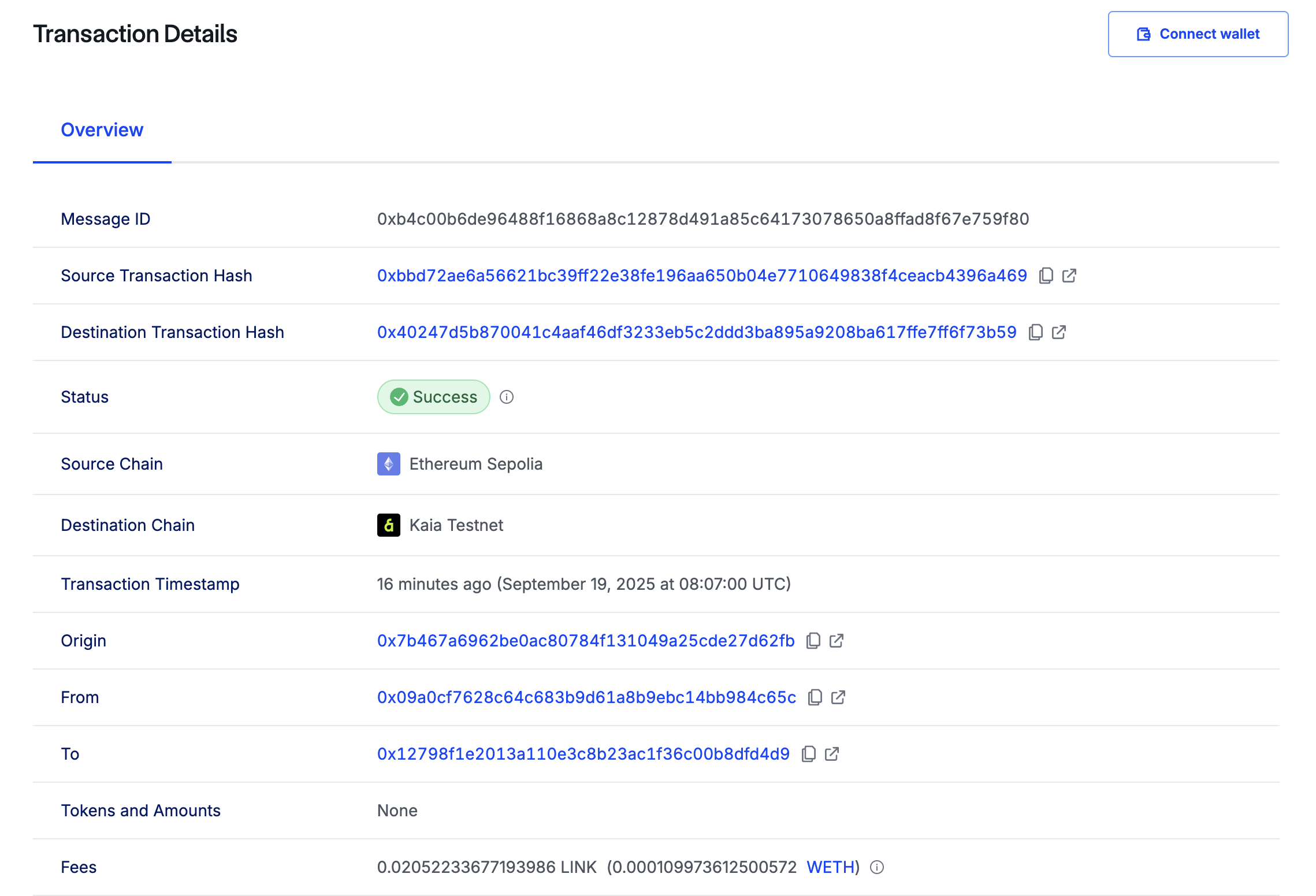
接下来要做的是检查目的地链上的接收器合同。为此,您需要运行下面的命令调用 getLastReceivedMessageDetails() :
cast call `RECEIVER_DEPLOYED_ADDRESS` --rpc-url $KAIROS_RPC_URL "getLastReceivedMessageDetails()"
将 RECEIVER_DEPLOYED_ADDRESS 替换为接收方合同的合同地址。
收到的文本和信息 ID 会以十六进制数据形式返回,就像这样:
0xb4c00b6de96488f16868a8c12878d491a85c64173078650a8ffad8f67e759f800000000000000000000000000000000000000000000000000000000000000040000000000000000000000000000000000000000000000000000000000000000e674b616961206275696c64657273000000000000000000000000000000000000
要将十六进制数据转换为字符串,特别是接收到的文本,请运行下面的命令:
cast to-utf8 674b616961206275696c64657273000000000000000000000000000000000000
现在你应该看到 gKaia builders,这意味着我们的跨链操作成功了。
结论
在本教程中,您将学习如何使用 Chainlink CCIP 从 Kaia Kairos Testnet 向另一条链 Ethereum Sepolia 发送消息,反之亦然。有关 Chainlink CCIP 及其工作原理的更多深入指南,请参阅 Chainlink CCIP Documentation。